Alan's deceptive robot.
Tuesday, September 14, 2010
Alan Becomes Famous
http://www.popsci.com/technology/article/2010-09/deceptive-robots-learn-when-and-how-pull-fast-one
Friday, September 10, 2010
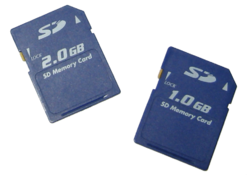
SD Card (Secure Digital Card)
A non-volatile memory card format for use in portable devices.
Friday, July 9, 2010
CISCO's new Android Tablet 7'' Screen and 1.15 lbs
Has a seven inch screen and special software for business calls and video conferencing. Its target is business.
GCN articale about the new device: http://gcn.com/articles/2010/07/08/cisco-intros-cius-teleconferencing-tablet.aspx?s=gcndaily_090710

http://gcn.com/articles/2010/07/08/%7E/media/GIG/GCN/Web/2010/cisco_cius_400.ashx
Cisco talks about the new device: http://cio.cisco.com/en/US/products/ps11156/index.html

http://cio.cisco.com/assets/prod/uc/vid/cius-ogilvy-188x115.jpg
GCN articale about the new device: http://gcn.com/articles/2010/07/08/cisco-intros-cius-teleconferencing-tablet.aspx?s=gcndaily_090710

http://gcn.com/articles/2010/07/08/%7E/media/GIG/GCN/Web/2010/cisco_cius_400.ashx
Cisco talks about the new device: http://cio.cisco.com/en/US/products/ps11156/index.html

http://cio.cisco.com/assets/prod/uc/vid/cius-ogilvy-188x115.jpg
Monday, July 5, 2010
FreeNAS
Would love to buy the Pogplugged. But I can't really afford the extra $107 right now.
http://ecx.images-amazon.com/images/I/41LnMgExJaL._SL210_.jpg
So I download the FreeNAS live CD.
Booted up my old portable from the CD.
Set the LAN IP address using option 2.
Connect from second machine using 'http://192.168.2.67:80'
Log in using 'admin/freenas'
Attached a windows USB drive.
How do I get FreeNAS to see it?
Took some looking before I realize that there is a green '+' to the right of the drive list. Selecting the '+' gave me the 'Disk|Add' window.
Change password to my favorite password.
Working from LiveCD so password is not saved.
The web interface is good if you have a single partition on a single drive, but that it not what I have.
trying by hand.
From the shell.
Using the following links for reference:
http://forums.freebsd.org/showthread.php?t=9819
http://www.freebsd.org/doc/en/books/handbook/disks-adding.html
Trying to see what drive dmesg saw: less /var/run/dmesg?
md0 - I think this is the drive in memory for the liveCD
ad0 - this is the drive for the protable
acd0 - the DVD drive
PC BIOS partitions are called slices.
See what 'slices' are on the USB drive I am testing with.
On USB stick: (da0)
Mounted the slice for the stick.
# mkdir /mnt/st1
# mount_msdosfs /dev/da0s1 /mnt/st1
#l ls /mnt/st1
Audio
It didn't show up in the WebGUI.
Unmount and used WebGUI.
Add drive than mount point.
I can see it from the shell now.
OK, how do i see it from another machine?
What to do from the WebGUI when you start:
Set the time. System -> General
Change the password. System -> Password
Add the disk. Disks -> Management
Set mount point. Disks ->Mount Point -> Management
Trying to connect. Looks like Samba is already running on the FreeNAS.
Look like Samba is installed on the connecting machine.
Following this link: http://ubuntuforums.org/showthread.php?t=202605
Use command 'hostname' from command line to see host name.
Use "route -n" to find the gateway address: http://www.cyberciti.biz/faq/how-to-find-gateway-ip-address/
This seems to be a good tutorial: http://www.lagesse.org/freenas-tutorial-for-windows-users-part-two-configuration/
Going to have to reboot in windows and test from there. The test fails in Ubuntu.
http://www.pogoplugged.com/page/community-store
http://ecx.images-amazon.com/images/I/41LnMgExJaL._SL210_.jpg
So I download the FreeNAS live CD.
Booted up my old portable from the CD.
Set the LAN IP address using option 2.
Connect from second machine using 'http://192.168.2.67:80'
Log in using 'admin/freenas'
Attached a windows USB drive.
How do I get FreeNAS to see it?
Took some looking before I realize that there is a green '+' to the right of the drive list. Selecting the '+' gave me the 'Disk|Add' window.
Change password to my favorite password.
Working from LiveCD so password is not saved.
The web interface is good if you have a single partition on a single drive, but that it not what I have.
trying by hand.
From the shell.
Using the following links for reference:
http://forums.freebsd.org/showthread.php?t=9819
http://www.freebsd.org/doc/en/books/handbook/disks-adding.html
Trying to see what drive dmesg saw: less /var/run/dmesg?
md0 - I think this is the drive in memory for the liveCD
ad0 - this is the drive for the protable
acd0 - the DVD drive
PC BIOS partitions are called slices.
See what 'slices' are on the USB drive I am testing with.
On USB stick: (da0)
- FAT 32 (shows as da0)
- NextStarNTFS57: 61 GB NTFS
- 6.2 GB FAT
- 50 GB Ext 3
- 2.2 GB logical partition
Mounted the slice for the stick.
# mkdir /mnt/st1
# mount_msdosfs /dev/da0s1 /mnt/st1
#l ls /mnt/st1
Audio
It didn't show up in the WebGUI.
Unmount and used WebGUI.
Add drive than mount point.
I can see it from the shell now.
OK, how do i see it from another machine?
What to do from the WebGUI when you start:
Set the time. System -> General
Change the password. System -> Password
Add the disk. Disks -> Management
Set mount point. Disks ->Mount Point -> Management
Trying to connect. Looks like Samba is already running on the FreeNAS.
Look like Samba is installed on the connecting machine.
Following this link: http://ubuntuforums.org/showthread.php?t=202605
Use command 'hostname' from command line to see host name.
Use "route -n" to find the gateway address: http://www.cyberciti.biz/faq/how-to-find-gateway-ip-address/
This seems to be a good tutorial: http://www.lagesse.org/freenas-tutorial-for-windows-users-part-two-configuration/
Going to have to reboot in windows and test from there. The test fails in Ubuntu.
http://www.pogoplugged.com/page/community-store
Looking to Buy Power Inverter for Car
Looking to buy a new power inverter for my car. The old one died after many year. I think I have found a good one. The XOVision Xo200. Both WalMart and Amazon have it for the same price ($18). However, I can save $6 is shipping if I use the Walmart site to store option.
I was not able to find a good review on the product. Even the XOVision site was a little weak.
It looks like the size of the average fuse for the car's cigarette lighter is 15 Amps.
Unfortunately, Walmart stock was out, so I bought it from Amazon. Should be here by the 7th of July.
http://ecx.images-amazon.com/images/I/41K87oDYo-L._SL160_AA160_.jpg
I would also like to buy the XoVision 600W Power Inverter, XO360. This one would need to be connect directly to the battery. But the 600W max and 360W continus looks pretty nice and at $18, it is really hard to bet.
http://i.walmartimages.com/i/p/00/18/11/52/00/0018115200033_215X215.jpg
I was not able to find a good review on the product. Even the XOVision site was a little weak.
It looks like the size of the average fuse for the car's cigarette lighter is 15 Amps.
Unfortunately, Walmart stock was out, so I bought it from Amazon. Should be here by the 7th of July.
http://ecx.images-amazon.com/images/I/41K87oDYo-L._SL160_AA160_.jpg
I would also like to buy the XoVision 600W Power Inverter, XO360. This one would need to be connect directly to the battery. But the 600W max and 360W continus looks pretty nice and at $18, it is really hard to bet.
http://i.walmartimages.com/i/p/00/18/11/52/00/0018115200033_215X215.jpg
Tuesday, June 8, 2010
Keyboard and Mouse Sharing
Can be done with Synergy and Synergy+ in the open source area. Can be done with done with Multiplicity and ZoneScreen if you want to buy the application. Synergy will work across Linux and Windows. Multiplicity and ZoneScreen only seem to work with Windows but is much more capable. This is a nice site that shows the alternatives.
Subscribe to:
Comments (Atom)
